CI/CD Study 4주차 ArgoCD 1/3 (1)
가시다님이 운영하시는 CI/CD Study 4주차 내용과 예제로 배우는 ArgoCD 책의 내용을 정리한 게시글 입니다.
1. GitOps와 Kubernetes
실습 환경 구성
# kind k8s 배포
kind create cluster --name myk8s --image kindest/node:v1.32.8 --config - <<EOF
kind: Cluster
apiVersion: kind.x-k8s.io/v1alpha4
nodes:
- role: control-plane
  extraPortMappings:
  - containerPort: 30000
    hostPort: 30000
  - containerPort: 30001
    hostPort: 30001
  - containerPort: 30002
    hostPort: 30002
  - containerPort: 30003
    hostPort: 30003
EOF
간단한 GitOps Operator 실습
ArgoCD가 존재하지 않았을때, 다음과 같은 동작을 수행할 필요가 있는 경우 어떻게 구현했는지 알아보겠습니다.
- Git Repository를 Clone 수행 기존에 복제했다면 pull을 수행하여 내용을 동기화 한다.
- Git Repository의 내용을 적용 한다.
- 1,2 과정을 반복하여 변경 사항을 지속적으로 적용한다.
golang을 이용하여 GitOps Operator를 구축하였고, 주된 코드 부분만 확인해보겠습니다.
# Go 설치
apt install golang-go -y

# 실습 Repository 복제
git clone https://github.com/PacktPublishing/ArgoCD-in-Practice.git

# 소스코드 위치 경로로 이동
cd ArgoCD-in-Practice/ch01/basic-gitops-operator
go-git Library의 git.PlainClone Method를 이용하여 Repository를 복제하고 동기화를 시도합니다.
Repository가 존재하는 경우 ErrRepositoryAlreadyExists에러가 발생하고, 로컬에서 Pull Method를 이용하여 Repository의 최신 버전을 유지합니다.
applyManifestsClient Method에서 현재 Repository의 내용을 kubectl apply를 수행하여 Kubenretes Cluster에 적용합니다.
// ch01/basic-gitops-operator/main.go
func syncRepo(repoUrl, localPath string) error {
        _, err := git.PlainClone(localPath, false, &git.CloneOptions{
                URL:      repoUrl,
                Progress: os.Stdout,
        })

        if err == git.ErrRepositoryAlreadyExists {
                repo, err := git.PlainOpen(localPath)
                if err != nil {
                        return err
                }
                w, err := repo.Worktree()
                if err != nil {
                        return err
                }
                err = w.Pull(&git.PullOptions{
                        RemoteName: "origin",
                        Progress:   os.Stdout,
                })
                if err == git.NoErrAlreadyUpToDate {
                        return nil
                }
                return err
        }
        return err
}


func applyManifestsClient(localPath string) error {
        dir, err := os.Getwd()
        if err != nil {
                return err
        }

        cmd := exec.Command("kubectl", "apply", "-f", path.Join(dir, localPath))
        cmd.Stdout = os.Stdout
        cmd.Stderr = os.Stderr
        err = cmd.Run()
        return err
}
직접 실행을 해보겠습니다.
go run main.go

# next sync in 5s
# start repo sync
# start manifests apply
# deployment.apps/nginx unchanged
# namespace/nginx unchanged


# 배포할 Manifest 파일
tree basic-gitops-operator-config
├── deployment.yaml
└── namespace.yaml

# 신규 터미널 : 생성 확인
kubectl get deploy,pod -n nginx

# NAME                    READY   UP-TO-DATE   AVAILABLE   AGE
# deployment.apps/nginx   0/1     1            0           5s

# NAME                         READY   STATUS              RESTARTS   AGE
# pod/nginx-5869d7778c-fl2nx   0/1     ContainerCreating   0          5s

# 리소스 제거
kubectl delete ns nginx
2. Argo CD 시작하기
ArgoCD의 등장 배경
Kubernetes에서 개발, 스테이징, 프로덕션 등 여러 환경을 운영할 때 각 환경의 구성이 시간이 지나면서 달라지는 Configuration Drift(구성 드리프트) 문제가 발생합니다. 이를 해결하기 위해 Helm과 같은 패키지 매니저를 사용할 수 있지만, 이는 버전 추적과 관리 복잡성을 증가시키는 단점이 있습니다.
이에 대한 근본적인 해결책으로 GitOps를 제시합니다. Git 저장소를 단일 진실 공급원(Single Source of Truth)으로 사용하여 모든 환경의 의도된 상태를 코드로 관리합니다. ArgoCD와 같은 컨트롤러는 Git 저장소의 상태와 실제 클러스터의 상태를 지속적으로 비교하여 차이가 발생하면 자동으로 동기화합니다. 이를 통해 구성 드리프트를 방지하고, 모든 변경 이력을 Git을 통해 명확하게 추적 및 관리할 수 있습니다.
ArgoCD의 핵심 개념
Git Repository의 의도한 상태를 Cluster와 일치시켜야 하고, 필요한 환경에 따라 전달합니다.
이 과정을 Reconcilling(조정) 이라고 말하며, Argo CD는 Git Repository에서 Kubernetes로 항상 조정을 반복적으로 수행 합니다.
Argo CD는 바라보는 Git Repository에 있는 Helm Chart를 kubernetes Yaml로 Rendering을 수행합니다. 이때 클러스터를 의도한 상태와 비교하는데 이 것을 동기화 상태(sync status) 라고 합니다.
비교 시 ArgoCD가 Helm install을 수행하지 않고 kubectl apply 를 수행하는데 그 이유는, 특정 도구만 지원 하는 것이 아닌 GitOps 원칙에 맞는 선언적 도구로 사용해 원하는 상태를 배포하는 것이 목적이기 때문입니다.
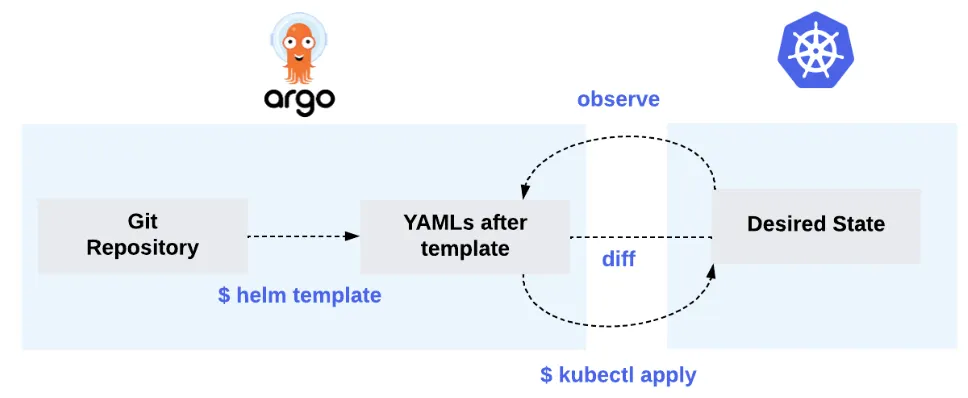
Figure 2.1 Helm 사용 시 Reconcilling 설명
ArgoCD Architecture
- API 서버
- 웹 UI, CLI, Argo Event, CI/CD 시스템 같이 다른 시스템과도 API를 통해 상호 작용한다.
- API 서버의 역할
- Application 관리 및 상태 보고
- Application Trigger 작업
- Git Repository와 Kubernetes Cluster 관리
- 인증과 SSO 지원
- RBAC 정책 강화
- Repository Server
- Repository Server의 주요 역할은 Application Manifest를 보관하는 Git Repository의 로컬 캐시를 유지하는 것이다.
- 다른 Argo CD 컴포넌트는 Kubernetes Manifest를 가져오기 위해 리포지터리 서버에 요청한다.
- 요청할 때 필요한 매개 변수는 다음과 같다.
- Repository URL
- git version
- Application 경로
- 템플릿 세부설정 : 매개변수, ksonnet 의 environmnet, helm의 values
- Application Controller
- Application 컨트롤러는 지속적으로 Application의 현재 상태를 확인하고, Git Repository의 의도한 상태와 비교한다.
- 만약 리소스를 수정했는데 상태가 동기화되지 않은 경우, 컨트롤러가 상태를 동기화하려고 하며, 현재 상태를 의도한 상태와 맞추려고 한다.
- 또 다른 역할은 사용자가 생성한 hook 을 생명 주기 동안 실행시킨다.

Figure 2.2 ArgoCd Architecture 설명
Argo CD의 핵심 오브젝트와 리소스
- Application
- Kubernetes Cluster에 배포하려는 Application의 Instance를 Application 이라는 CRD로 구현힌 것
apiVersion: argoproj.io/v1alpha1
kind: Application
metadata:
  name: nginx
  namespace: argocd
spec:
  project: default
  source:
    repoURL: https://charts.bitnami.com/bitnami
    chart: nginx
    targetRevision: 13.2.10
  destination:
    namespace: nginx
server: https://kubernetes.default.svc- App Project
- Application처럼 App Projec CRD는 태그 지정과 같이 관련 있는 Application을 논리적으로 그룹화 하는 역할을 하는 CRD
apiVersion: argoproj.io/v1alpha1
kind: AppProject
metadata:
  name: default
  namespace: argocd
spec:
  # *대신 Repository URL을 넣으면 App Project별 접근 가능한 Repository구분 가능
  sourceRepos:
    - '*'

  # 애플리케이션이 동일한 클러스터의 guestbook 네임스페이스에만 배포되도록 허용
  destinations:
    - namespace: guestbook                    #'*'
      server: https://kubernetes.default.svc  #'*'

  # 네임스페이스를 제외하고 모든 클러스터 범위에서 리소스 생성 거부
  clusterResourceWhitelist:
    - group: '*'
kind: Namespace #'*' - Repository Credentials
- Argo CD가 Repository에 접근하기 위한 자격 증명을 Secret 객체에 저장합니다.
- Repository 접근 시 HTTP 인증 과 SSH Key를 통해 접근할 수 있습니다.
# HTTPS 인증 방식 (예시)
apiVersion: v1
kind: Secret
metadata:
  name: repo-credentials-https
  namespace: argocd                             # 반드시 argocd 네임스페이스여야 함
  labels:
    argocd.argoproj.io/secret-type: repository  # Argo CD가 이 Secret을 “저장소 접근 자격”으로 인식하는 라벨
stringData:
  url: https://github.com/your-org/private-repo.git
  username: your-github-username
  password: ghp_xxxxxxxxxxxxxxxxxxxxxxx         # Personal Access Token (PAT) 또는 비밀번호


# SSH Key 인증 방식 (예시)
apiVersion: v1
kind: Secret
metadata:
  name: repo-credentials-ssh
  namespace: argocd
  labels:
    argocd.argoproj.io/secret-type: repository
stringData:
  url: git@github.com:your-org/private-repo.git  # SSH 형태의 주소
  sshPrivateKey: |
    -----BEGIN OPENSSH PRIVATE KEY-----
    MIIEvQIBADANBgkqhkiG9w0BAQEFAASC...
-----END OPENSSH PRIVATE KEY------ Cluster Credentials
- ArgoCD가 여러 Cluster를 관리 할 때 다른 Cluster에 대한 접근 권한을 얻기 위해 사용하는 자격증명입니다.
- Repository Credentials와 동일하게 Secret 객체에 정보를 저장하지만, Label로 구분합니다.
apiVersion: v1
kind: Secret
metadata:
  name: cluster-credentials-dev
  namespace: argocd
  labels:
    argocd.argoproj.io/secret-type: cluster
stringData:
  name: dev-cluster                         # Argo CD 내에서 표시될 클러스터 이름
  server: https://123.45.67.89:6443         # 대상 클러스터의 API 서버 주소
  config: |                                 # JSON 형태의 kubeconfig 일부. Argo CD가 인증에 사용
    {
      "bearerToken": "eyJhbGciOiJSUzI1NiIsImtpZCI6...", # 대상 클러스터의 ServiceAccount로부터 추출한 토큰
      "tlsClientConfig": {
        "insecure": false,                              # true일 경우 TLS 검증 비활성화 (개발용)
        "caData": "LS0tLS1CRUdJTiBDRVJUSUZJQ0FURS0t..." # 클러스터 CA 인증서 (Base64 인코딩된 값)
      }
    }
ArgoCD 설치
kubectl create ns argocd
cat <<EOF > argocd-values.yaml
server:
  service:
    type: NodePort
    nodePortHttps: 30002
  extraArgs:
    - --insecure  # HTTPS 대신 HTTP 사용
EOF

helm repo add argo https://argoproj.github.io/argo-helm
helm install argocd argo/argo-cd --version 9.0.5 -f argocd-values.yaml --namespace argocd

# 최초 접속 암호 확인
kubectl -n argocd get secret argocd-initial-admin-secret -o jsonpath="{.data.password}" | base64 -d ;echo
# yr8nuYYNt5B9RT2L

# 웹 접속
wslview "http://127.0.0.1:30002"
Application 실행
ArgoCD 설치 후 Applcation
# guestbook helm 차트 애플리케이션 생성
cat <<EOF | kubectl apply -f -
apiVersion: argoproj.io/v1alpha1
kind: Application
metadata:
  name: guestbook
  namespace: argocd
  finalizers:
  - resources-finalizer.argocd.argoproj.io
spec:
  project: default
  source:
    helm:
      valueFiles:
      - values.yaml
    path: helm-guestbook
    repoURL: https://github.com/argoproj/argocd-example-apps
    targetRevision: HEAD
  syncPolicy:
    automated:
      enabled: true
      prune: true
      selfHeal: true
    syncOptions:
    - CreateNamespace=true
  destination:
    namespace: guestbook
    server: https://kubernetes.default.svc
EOF


# finalizers.-resources... : # Argo CD가 Application을 삭제할 시 관련된 Kubernetes 리소스(Deployment, Ingress, Service ....) 를 먼저 정리 prune하도록 보장하는 설정
# targetRevision: HEAD       # 브랜치명 또는 commit , HEAD = 기본 브랜치 최신 커밋
# syncPolicy.automated.enabled: true          # 자동 동기화/배포 활성화
# syncPolicy.automated.prune: true            # Git에서 리소스가 제거되면 클러스터에서도 자동 삭제
# syncPolicy.automated.selfHeal: true         # 클러스터 리소스가 수동으로 변경되면 Git 상태로 자동 복구
# syncPolicy.syncOptions.CreateNamespace=true # 배포 대상 네임스페이스 guestbook 가 없으면 자동 생성

Figure 2.3 ArgoCD WebUI에서 상태 확인
# nodeport 변경 시도
kubectl patch svc -n guestbook guestbook-helm-guestbook -p '{"spec":{"type":"NodePort","ports":[{"port":80,"targetPort":80,"nodePort":30003}]}}'
NodePort 변경 시 변경이 안되는 이유는 Self Heal이 True값으로 되어있어서 값을 변경하게되면 Helm의 Values와 맞지 않기때문에 변경이 되지 않습니다.
Self Heal Option을 Disable하면 변경할 수 있습니다.

Figure 2.4 ArgoCD Self Heal Dsiable
# nodeport 변경
kubectl patch svc -n guestbook guestbook-helm-guestbook -p '{"spec":{"type":"NodePort","ports":[{"port":80,"targetPort":80,"nodePort":30003}]}}'


wslview "http://127.0.0.1:30003"


# App 삭제
kubectl delete applications -n argocd guestbook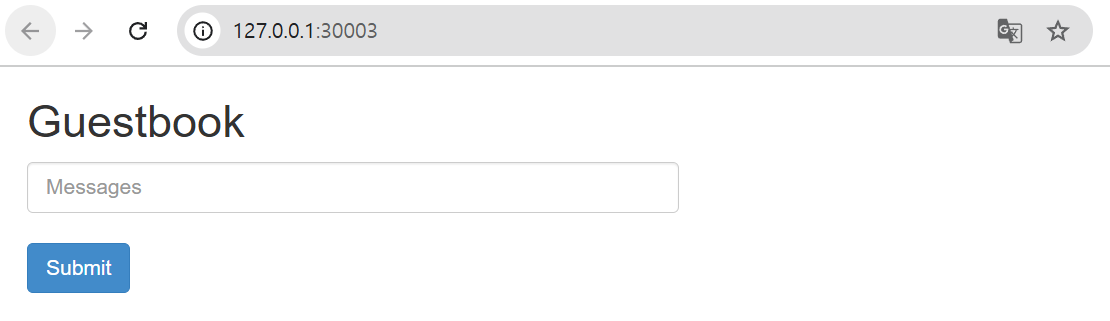
Figure 2.5 접속 확인
ArgoCD CLI 설치
VERSION=$(curl -L -s https://raw.githubusercontent.com/argoproj/argo-cd/stable/VERSION)
curl -sSL -o argocd-linux-amd64 https://github.com/argoproj/argo-cd/releases/download/v$VERSION/argocd-linux-amd64
sudo install -m 555 argocd-linux-amd64 /usr/local/bin/argocd
rm argocd-linux-amd64


argocd login 127.0.0.1:30002 --plaintext
# Username: admin
# Password: yr8nuYYNt5B9RT2L
# 'admin:login' logged in successfully
# Context '127.0.0.1:30002' updated
ArgoCD CLI로 Application 배포
ArgoCD CLI로 Application을 배포하게되는 경우 GitOps 원칙을 무시하기 때문에 권장하지 않습니다.
argocd app create guestbook --repo https://github.com/argoproj/argocd-example-apps.git --path helm-guestbook \
  --dest-server https://kubernetes.default.svc --dest-namespace guestbook --values values.yaml

# application 'guestbook' created

argocd app list
# NAME              CLUSTER                         NAMESPACE  PROJECT  STATUS     HEALTH   SYNCPOLICY  CONDITIONS  REPO                                                 PATH            TARGET
# argocd/guestbook  https://kubernetes.default.svc  guestbook  default  OutOfSync  Missing  Manual      <none>      https://github.com/argoproj/argocd-example-apps.git  helm-guestbook

# 직접 sync 실행
argocd app sync argocd/guestbook


# 삭제
argocd app delete argocd/guestbook

# 전체 리소스 삭제
helm uninstall -n argocd argocd && kubectl delete ns argocd
Argo CD AutoPilot
Argo CD AutoPilot Argo CD 설치 자동화 + GitOps 환경 초기화, 애플리케이션/클러스터 등 선언적 관리 가능을 제공합니다.
GitOps 사용해 Bootstrap Argo CD Application을 생성하고 관리할 수 있으며, Github Repository를 짜여진 구조로 셋팅해 새로운 서비스를 추가하고 Argo CD의 수명 주기에 적용한다.
현재는 Kustomize만 지원을 하고, Helm은 지원하지 않습니다.
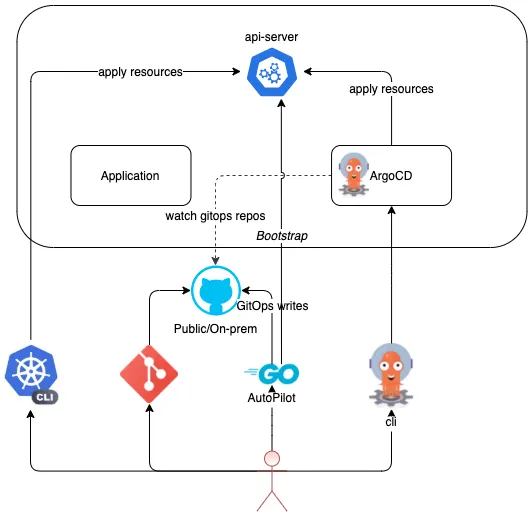
Figure 2.6 ArgoCD AutoPilot Architecture 원리
ArgoCD AutoPilot 실습
# install : Linux and WSL (using curl)
VERSION=$(curl --silent "https://api.github.com/repos/argoproj-labs/argocd-autopilot/releases/latest" | grep '"tag_name"' | sed -E 's/.*"([^"]+)".*/\1/')
curl -L --output - https://github.com/argoproj-labs/argocd-autopilot/releases/download/"$VERSION"/argocd-autopilot-linux-amd64.tar.gz | tar zx
mv ./argocd-autopilot-* /usr/local/bin/argocd-autopilot
argocd-autopilot version


export GIT_TOKEN=
export GIT_REPO=https://github.com/ymir0804/autopilot.git


argocd-autopilot repo bootstrap
# ArgoCD 배포
# INFO applying bootstrap manifests to cluster...
# namespace/argocd created
# Warning: resource customresourcedefinitions/applications.argoproj.io is missing the kubectl.kubernetes.io/last-applied-configuration annotation which is required by apply apply. apply apply should only be used on resources created declaratively by either apply create --save-config or apply apply. The missing annotation will be patched automatically.
# customresourcedefinition.apiextensi


# 신규 터미널
kubectl port-forward -n argocd svc/argocd-server 8080:80


# 최초 접속 암호 확인
kubectl -n argocd get secret argocd-initial-admin-secret -o jsonpath="{.data.password}" | base64 -d ;echo


# UI 접속
wslview http://localhost:8080

# applications 그룹핑을 app of apps 패턴이라고 부름 : 이 패턴은 다른 애플리케이션을 생성하는 메인 애플리케이션을 구축할 수 있다는 것.
# 애플리케이션 선언적 방식으로 애플리케이션 그룹을 관리할 수 있도록 해주고 구성과 배포를 함께 할 수 있음.
kubectl get applicationsets.argoproj.io -n argocd
# NAME                AGE
# cluster-resources   6m23s

Figure 2.7 ArgoCD Application 확인
ArgoCD의 자기 자신도 재귀적으로 관리가 됩니다. GIT_REPO 변수에 명시한 Repository의 주소에서 값이 변경된다면 Kubernetes에 반영을 하게 됩니다.
Project 생성 및 Application 추가
# 프로젝트 생성
argocd-autopilot project create dev
argocd-autopilot project create prd


# Project 확인
kubectl get appprojects.argoproj.io -n argocd
NAME      AGE
default   9m25s

Figure 2.8 ArgoCD Repository 확인
# 애플리케이션 생성
argocd-autopilot app create hello-world1 --app github.com/argoproj-labs/argocd-autopilot/examples/demo-app/ -p dev --type kustomize


kubectl get applications.argoproj.io -n argocd -owide
# NAME                           SYNC STATUS   HEALTH STATUS   REVISION                                   PROJECT
# argo-cd                        Synced        Healthy         d2112440ba1f083414b2612b482a2045d57945f5   default
# autopilot-bootstrap            Synced        Healthy         d2112440ba1f083414b2612b482a2045d57945f5   default
# cluster-resources-in-cluster   Synced        Healthy         d2112440ba1f083414b2612b482a2045d57945f5   default
# dev-hello-world1               Synced        Healthy         d2112440ba1f083414b2612b482a2045d57945f5   dev
# root                           Synced        Healthy         d2112440ba1f083414b2612b482a2045d57945f5   default


# 실습을 위해 리소스 삭제
kind delete cluster --name myk8s
ArgoCD AutoPilot의 동기화 원리
ArgoCD에서의 Resource Hook은 다음과 같습니다.


Figure 2.0 ArgoCD Resource Hook
- PreSync hook
- 동기화 단계 전에 완료돼야 하는 작업을 수행할 때 사용
- Sync hook
- 정교하고 복잡한 배포를 오케스트레이션 하는 데 사용한다.
- PostSync hook
- 배포 후에 통합 및 상태 확인을 하거나, 새로운 릴리즈나 다른 시스템과 통합 같은 내용을 알리는 데 사용
- SyncFail hook
- 동기화 작업이 실패했을 경우 로직을 정리 또는 종료시킬 때 사용
Hook을 사용 시 Annotation을 이용하여 ArgoCD에게 전달을 합니다.
apiVersion: batch/v1
kind: Job
metadata:
  name: db-migrate
  annotations:
argocd.argoproj.io/hook: PreSync'DevOps > Study' 카테고리의 다른 글
| CI/CD Study 5주차 ArgoCD 2/3 (1) | 2025.11.16 |
|---|---|
| CI/CD Study 4주차 ArgoCD 1/3 (2) (0) | 2025.11.08 |
| CI/CD Study 3주차 Jenkins, ArgoCD (0) | 2025.11.02 |
| CI/CD Study 2주차 Cloud Native CI/CD (1) | 2025.10.26 |
| CI/CD Study 2주차 Helm (0) | 2025.10.26 |