CI/CD Study 2주차 Cloud Native CI/CD
가시다님이 운영하시는 CI/CD Study 2주차 내용을 정리한 게시글 입니다.
1. Tekton
✅ Tekton 이란?
k8s Native0(Kubernetes-native) CI/CD Framework이며 CI/CD Pipeline의 모든 구성요소를 k8s object처럼 YAML 파일로 정의하고 관리할 수 있게 해주는 오픈 소스 도구입니다.
k8s의 확장 기능(Custom Resource Definitions, CRD)으로 설치되어, Pipeline의 각 단계를 k8s의 Pod로 실행합니다. 이 덕분에 Pipeline의 자체가 Cloud Native의 장점인 이식성, 확장성, 선언적 관리를 그대로 사용할 수 있습니다.
Tekton Component 개념
- Step
- 파이프라인의 가장 작은 실행 단위로, 하나의 컨테이너에 해당합니다.
- git clone, docker build, kubectl apply와 같은 단일 명령을 수행합니다.
- Task
- 순서가 있는 Step들의 집합입니다.
- 소스코드 빌드, 이미지 푸시 등 하나의 논리적인 작업을 정의하며, 실행될 때 하나의 Pod로 생성됩니다. Task는 독립적으로 재사용이 가능합니다.
- TaskRun
- Task를 실제로 실행시키는 Object입니다.
- Task 템플릿에 파라미터를 전달하여 특정 작업을 수행하도록 지시합니다.
- TaskRun이 생성되면 Tekton 컨트롤러가 Pod를 생성하여 작업을 실행합니다.
- Pipeline
- 여러 Task들을 순서나 실행 조건에 따라 엮어놓은 전체 워크플로우입니다.
- Task들을 DAG(방향성 비순환 그래프) 형태로 구성하여 병렬 또는 순차 실행을 정의할 수 있습니다.
- PipelineRun
- Pipeline을 실제로 실행시키는 오브젝트입니다.
- PipelineRun이 생성되면 그 안에 정의된 Task들을 실행하기 위한 TaskRun들이 자동으로 생성됩니다.
- Workspace
- Task들이 실행 중에 파일을 공유하거나 결과를 저장하기 위해 사용하는 볼륨입니다.
- PVC(PersistentVolumeClaim)를 통해 여러 Task가 데이터를 공유할 수 있습니다.
- Trigger
- 외부 이벤트(예: GitHub의 push나 pull request)에 응답하여 PipelineRun을 자동으로 생성하는 컴포넌트입니다.
- EventListener, TriggerTemplate, TriggerBinding 등으로 구성되어 Webhook을 통해 CI/CD 파이프라인을 자동화하는 핵심 역할을 합니다.
Tetkon의 구성요소
Tekton은 Module식 구조로 되어있으며, 모든 구성 요소들을 개별로 설치하거나 한번에 설치 할 수 있습니다.
- Tekton Pipelines
- Tekton의 기반이며 CI/CD Pipeline을 구성하는 빌딩 블록 역할을 하는 k8s CRD 리소스를 정의 합니다.

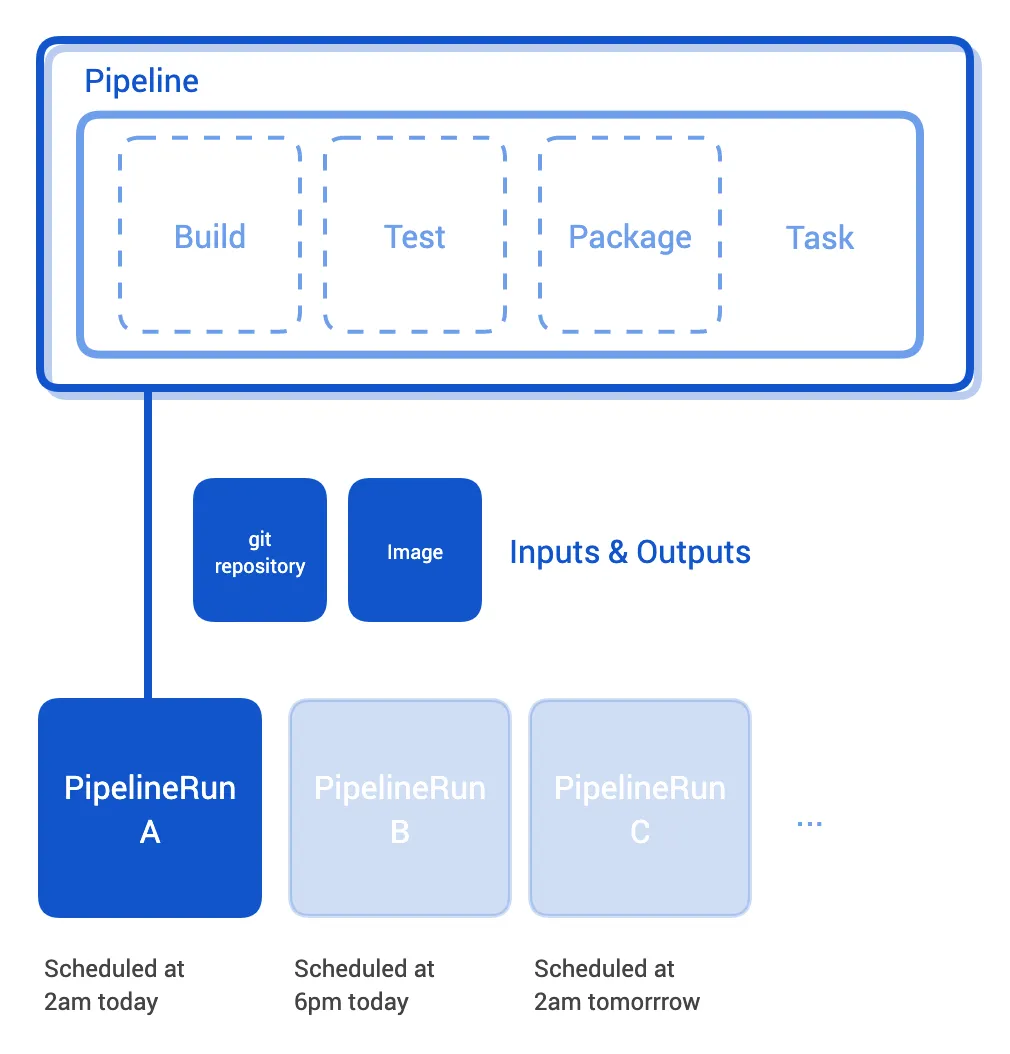
Figure 1.1 Tekton Pipelines 설명
- Tekton Triggers
- 이벤트 기반으로 파이프라인을 인스턴스화하는 역할을 수행 합니다.
- Tekton Dashbaord
- 파이프라인과 로그를 시각화 할 수 있는 대시보드
- Tekton CLI
- 텍톤 객체를 관리하기 위한 CLI
- Tekton Catalog
- 커뮤니티에서 기여한 고품질의 Tekton 구성 요소를 모아놓은 구성 요소 입니다.
- Tekton hub
- Tekton 카탈로그에 접근하기 위한 웹 기반 그래픽 인터페이스
- Tekton Operator
- k8s Cluster에 Tekton 프로젝트를 설치, 업데이트, 제거할 수 있는 k8s Operator 패턴
- Tekton Chain
- Tekton Pipelines로 구축된 Artifact의 출처를 생성, 저장하고 서명하는 도구를 제공

Figure 1.2 Tekton Chain 설명
실습환경 구성
kind create cluster --name myk8s --image kindest/node:v1.32.8 --config - <<EOF
kind: Cluster
apiVersion: kind.x-k8s.io/v1alpha4
nodes:
- role: control-plane
  extraPortMappings:
  - containerPort: 30000
    hostPort: 30000
  - containerPort: 30001
    hostPort: 30001
EOF


# Tekton dependency 파이프라인(pipeline) 설치 : 현재 v1.5.0
kubectl apply -f https://storage.googleapis.com/tekton-releases/pipeline/latest/release.yaml


# Tekton Trigger 설치 : 현재 v0.33.0
kubectl apply -f https://storage.googleapis.com/tekton-releases/triggers/latest/release.yaml
kubectl apply -f https://storage.googleapis.com/tekton-releases/triggers/latest/interceptors.yaml

# Tekton Dashboard 설치 : 현재 v0.62.0
kubectl apply -f https://storage.googleapis.com/tekton-releases/dashboard/latest/release.yaml

# service 를 Nodeport 설정 : nodePort 30000
kubectl patch svc -n tekton-pipelines tekton-dashboard -p '{"spec":{"type":"NodePort","ports":[{"port":9097,"targetPort":9097,"nodePort":30000}]}}'

# 접속
wslview http://127.0.0.1:30000


# CLI 설치 공식문서에서 내용 사용 불가
# Get the tar.xz
curl -LO https://github.com/tektoncd/cli/releases/download/v0.42.0/tkn_0.42.0_Linux_x86_64.tar.gz
# Extract tkn to your PATH (e.g. /usr/local/bin)
sudo tar xvzf tkn_0.42.0_Linux_x86_64.tar.gz -C /usr/bin/tkn
Task 실습
Tekton에서 Task는 작업 수행에 필요한 로직을 순차적으로 실행하는 step 들로 정의됩니다.
모든 Task는 Pod 로 실행되며, 각 단계는 자체 컨테이너에서 실행됩니다.
한 Task 안의 각 단계들은 순차적으로 실행되지만, Task들끼리는 서로 병렬적으로 실행될 수 있습니다.
따라서 Task는 텍톤으로 파이프라인을 만드는 가장 기본 단위입니다.
# task 생성
cat << EOF | kubectl apply -f -
apiVersion: tekton.dev/v1
kind: Task
metadata:
  name: hello
spec:
  steps:
    - name: echo    # step 이름
      image: alpine # step 수행 컨테이너 이미지
      script: |
        #!/bin/sh
        echo "Hello World"
EOF

tkn task list
# NAME    DESCRIPTION   AGE
# hello                 19 minutes ago
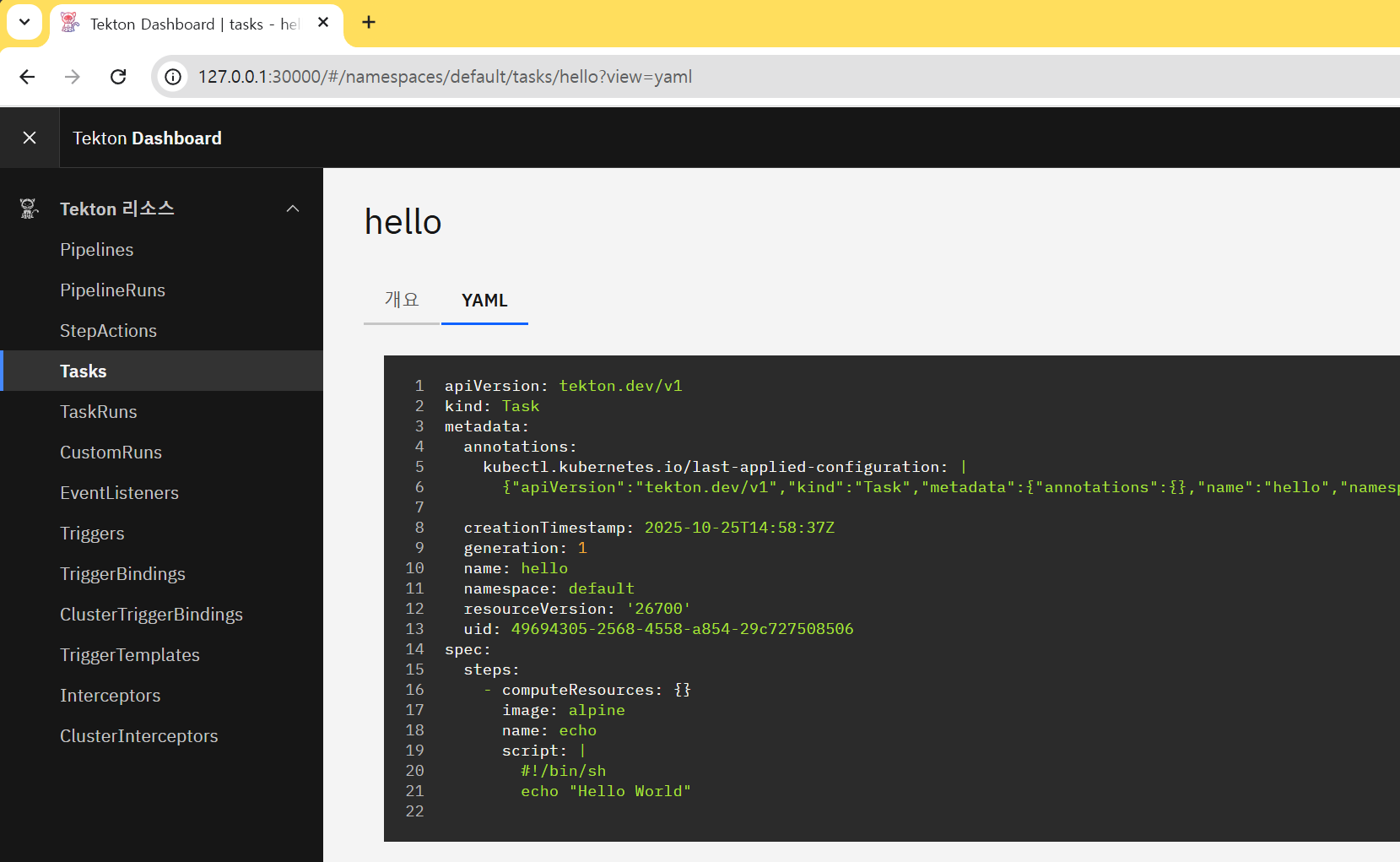
Figure 1.3 Task 확인
Tekton CLI로 Task를 실행해보겠습니다.
tkn task start --showlog hello
# TaskRun started: hello-run-mm6pb
# Waiting for logs to be available...
# [echo] Hello World

# 다음 실습을 위해 taskrun 삭제
kubectl delete taskruns --all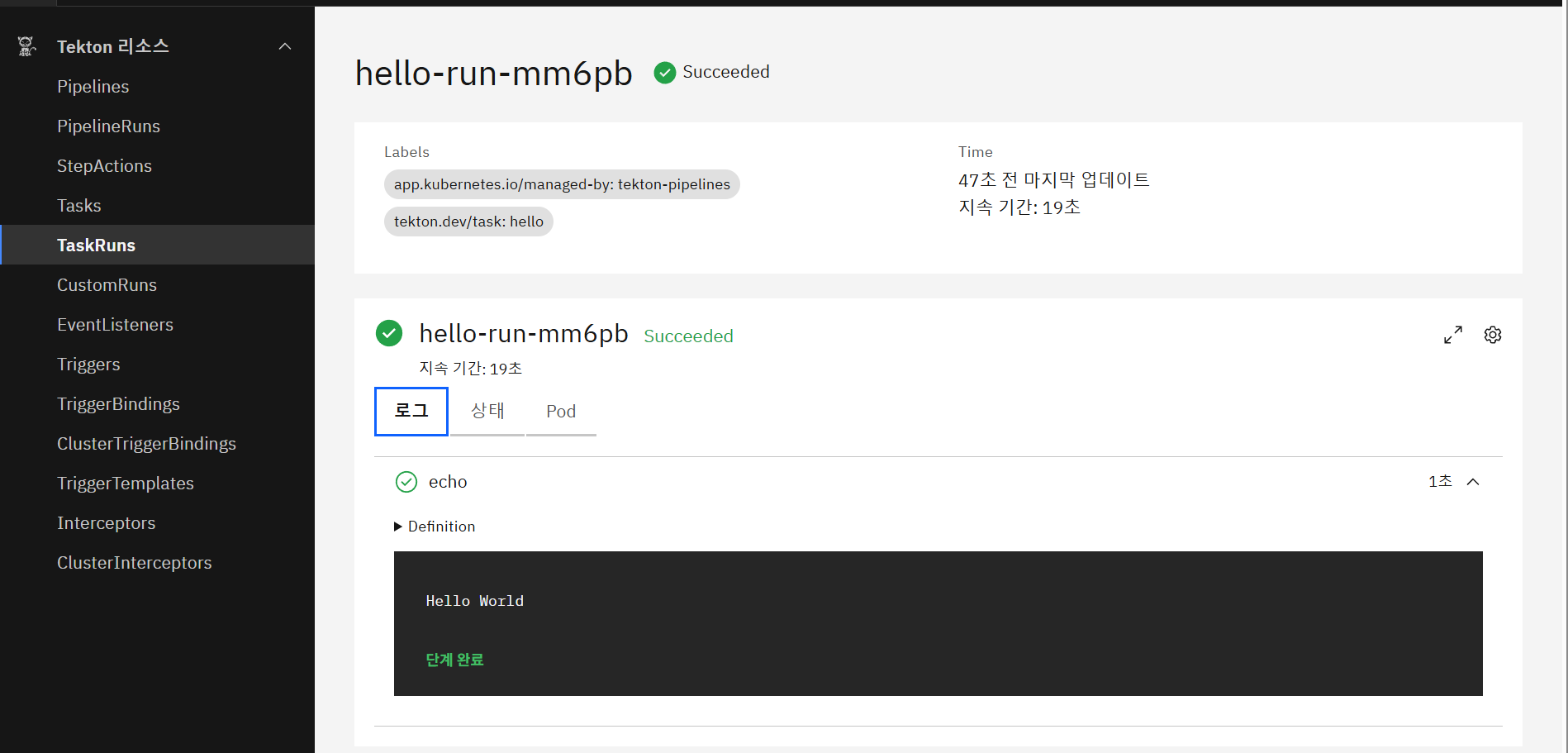
Figure 1.3 Task Run 확인
Tekton을 사용한 Git 저장소에 보관된 앱 코드를 컴파일하고 패키징하는 작업을 자동화
Task Yaml 정의 시 input과 output이 잘 정의된 Task를 생성합니다. 이때 Optional field을 사용합니다.
Optional Field는 다음과 같이 구성되어있습니다.
- inputs
- 해당 Task가 소비하는 ingested Resource
- outputs
- 해당 Task가 생산하는 produced Resource
- params
- Tasks에 포함된 steps 이 사용할 인자. 각 인자는 다음 필드값을 갖는다.
- name : 인자의 이름
- description : 인자에 대한 설명
- default : 인자의 기본값
- results : Task 가 실행 결과를 기록할 이름들
- workspaces : Task가 필요로 하는 볼륨 volume 들의 경로
- volumes : Task에 마운트될 외부 볼륨들
Tekton Pipelines를 사용하여 git에서 소스 코드를 복제하는 pipeline을 구성해보겠습니다.
pipeline 구성 시 workspace라는 파일 시스템을 사용하여 파일을 공유할 수 있습니다.
이때 Tekton Hub에서 제공하는 Task들을 이용해서 수행 합니다.
cat << EOF | kubectl apply -f -
apiVersion: tekton.dev/v1
kind: Pipeline
metadata:
  name: clone-read
spec:
  description: |
    This pipeline clones a git repo, then echoes the README file to the stout.
  params:     # 매개변수 repo-url
  - name: repo-url
    type: string
    description: The git repo URL to clone from.
  workspaces: # 다운로드할 코드를 저장할 공유 볼륨인 작업 공간을 추가
  - name: shared-data
    description: |
      This workspace contains the cloned repo files, so they can be read by the
      next task.
  tasks:      # task 정의
  - name: fetch-source
    taskRef:
      name: git-clone
    workspaces:
    - name: output
      workspace: shared-data
    params:
    - name: url
      value: \$(params.repo-url)
EOF

# 확인
tkn pipeline list
# NAME         AGE              LAST RUN   STARTED   DURATION   STATUS
# clone-read   12 seconds ago   ---        ---       ---        ---


# 파이프라인에서 git clone 작업을 사용하려면 먼저 클러스터에 설치 필요 : tacket hub 에서 가져오기
tkn hub install task git-clone


# 파이프라인 재실행
cat << EOF | kubectl create -f -
apiVersion: tekton.dev/v1
kind: PipelineRun
metadata:
  generateName: clone-read-run-
spec:
  pipelineRef:
    name: clone-read
  taskRunTemplate:
    podTemplate:
      securityContext:
        fsGroup: 65532
  workspaces:
  - name: shared-data
    volumeClaimTemplate:
      spec:
        accessModes:
        - ReadWriteOnce
        resources:
          requests:
            storage: 1Gi
  params:
  - name: repo-url
    value: https://github.com/tektoncd/website
EOF


tkn pipelinerun list
# NAME                   STARTED         DURATION   STATUS
# clone-read-run-tnkv8   5 seconds ago   ---        Running

# 실습 완료 후 삭제
kubectl delete pipelineruns.tekton.dev --all

Figure 1.4 pipeline 확인
Tekton을 이용하여 비공개 Git 저장소의 앱을 컴파일하고 패키징
Tekton은 Git을 위해서 Basic-auth와 SSH 인증체계를 지원 합니다.
두가지 옵션을 사용하기 위한 정보들을 k8s Secret에 저장하고 Tekton의 Task와 pipeline을 실행하는 Service Account에 연결해서 사용합니다.
실습을 위해 Github에서 Repository를 생성하고 PAT를 생성합니다.
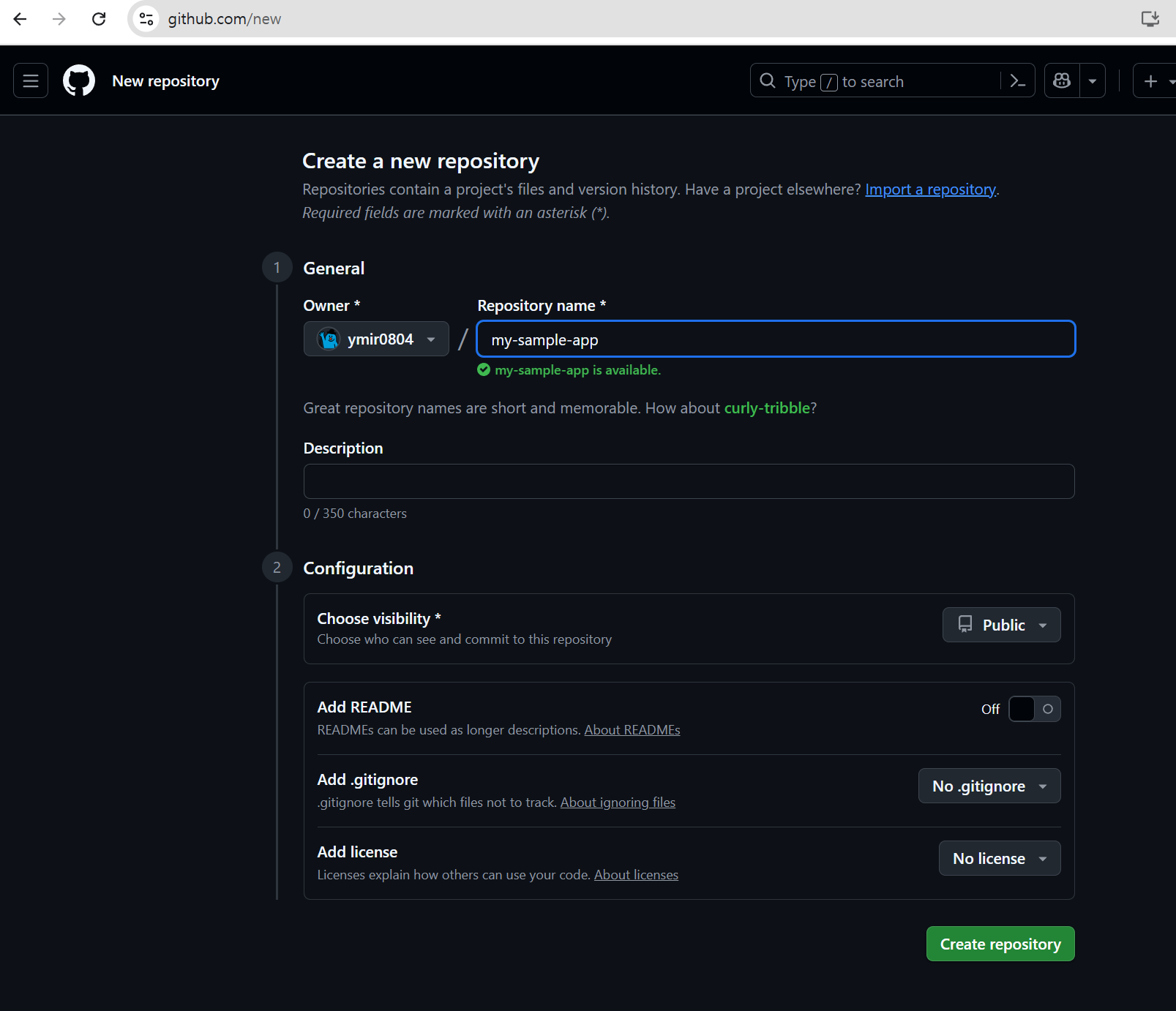
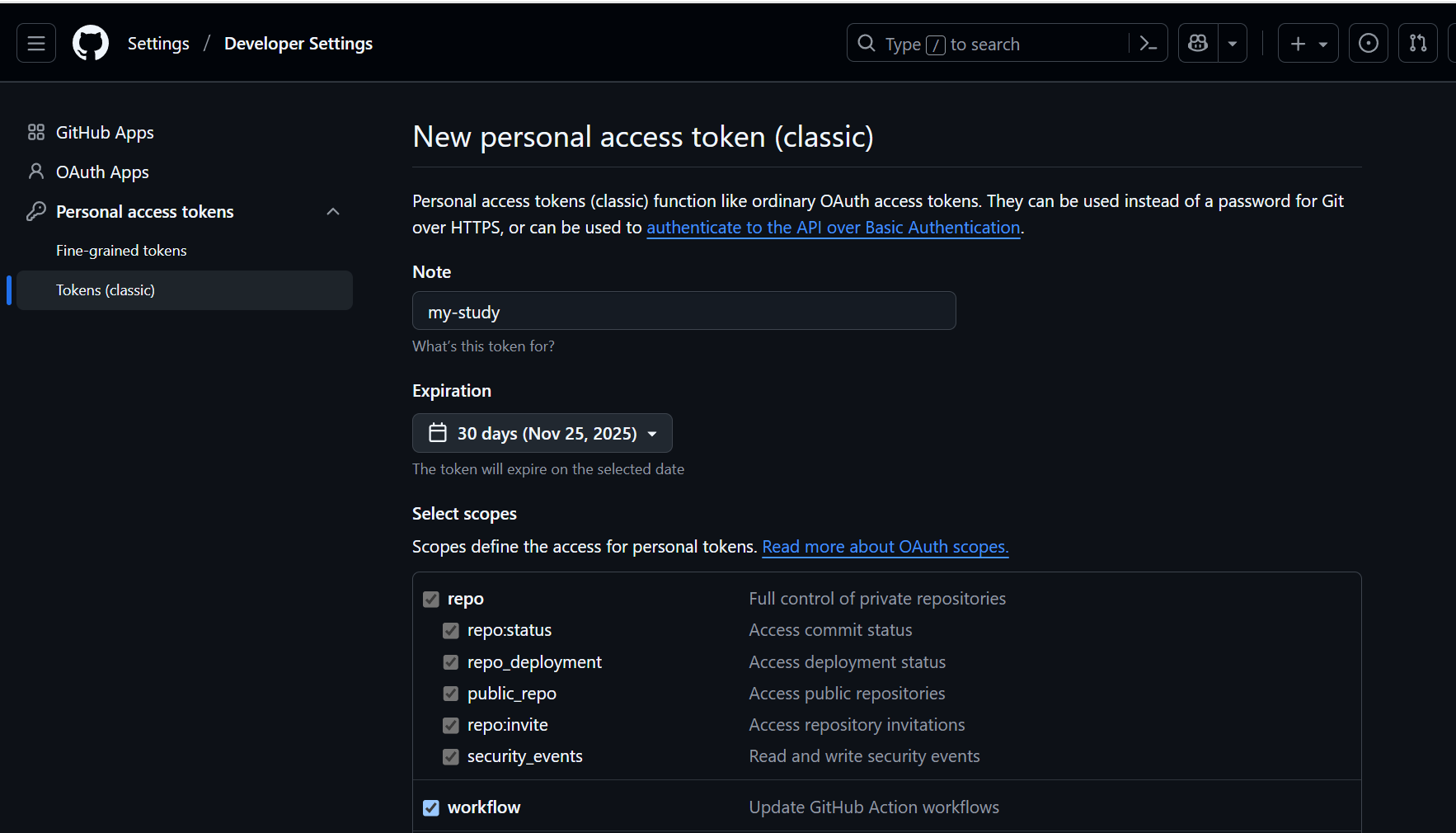
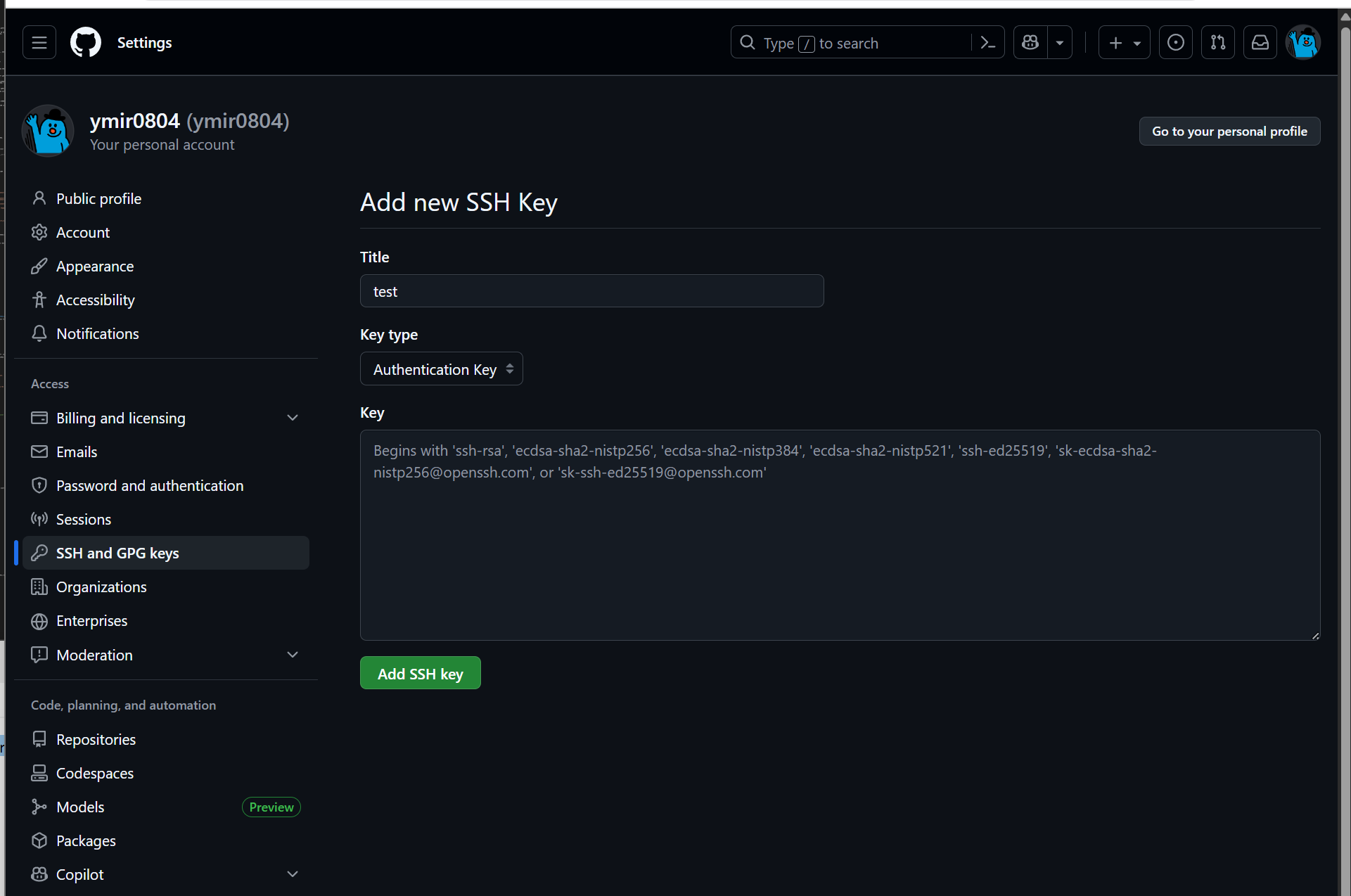
Figure 1.5 실습환경 구성
# 작업 폴더 생성
mkdir my-sample-app
cd my-sample-app


# 샘플 파일 만들기 (Node.js 예시)
echo 'console.log("Hello GitHub!");' > app.js


# 파일 추가 및 커밋
git add .
git commit -m "Initial commit - sample app"


# origin remote 등록:
git remote add origin https://github.com/ymir0804/my-sample-app.git


# 메인 브랜치 이름을 main으로 변경 (GitHub 기본 브랜치와 맞춤):
git branch -M main


git push -u origin main
# Username for 'https://github.com': ymir0804
# Password for 'https://ymir0804@github.com':
# Enumerating objects: 3, done.
# Counting objects: 100% (3/3), done.
# Writing objects: 100% (3/3), 250 bytes | 250.00 KiB/s, done.
# Total 3 (delta 0), reused 0 (delta 0), pack-reused 0
# To https://github.com/ymir0804/my-sample-app.git
#  * [new branch]      main -> main
# branch 'main' set up to track 'origin/main'.


# ssh 키 생성
ssh-keygen -t ed25519 -C "duswn916@kakao.com"

ssh-add ~/.ssh/id_ed25519

# 복사해두기
cat ~/.ssh/id_ed25519.pub

# GitHub → Settings → SSH and GPG keys → New SSH key → cat 명령어 수행 결과 붙여 넣기

ssh -i ~/.ssh/id_ed25519 -T git@github.com


git remote set-url origin git@github.com:ymir0804/my-sample-app.git
echo 'cicd study' > readme.md
git add .
git commit -m "add readme.md file"
git push -u origin main


# Git 인증용 SSH 사설키를 base64 인코딩
SSHPK=$(cat ~/.ssh/id_ed25519 | base64 -w0)

# Git 인증서버 known_hosts 값을 base64 인코딩
SSHKH=$(ssh-keyscan github.com | grep ecdsa-sha2-nistp256 | base64 -w0)
echo $SSHKH


cat << EOF | kubectl apply -f -
apiVersion: v1
kind: Secret
metadata:
  name: git-credentials
data:
  id_rsa: $SSHPK
  known_hosts: $SSHKH
EOF


# ServiceAccount 에 Secret 속성 지정
cat << EOF | kubectl apply -f -
apiVersion: v1
kind: ServiceAccount
metadata:
  name: build-bot
secrets:
  - name: git-credentials
EOF

# 파이프라인 파일 작성
cat << EOF | kubectl apply -f -
apiVersion: tekton.dev/v1
kind: Pipeline
metadata:
  name: my-clone-read
spec:
  description: |
    This pipeline clones a git repo, then echoes the README file to the stout.
  params:     # 매개변수 repo-url
  - name: repo-url
    type: string
    description: The git repo URL to clone from.
  workspaces: # 다운로드할 코드를 저장할 공유 볼륨인 작업 공간을 추가
  - name: shared-data
    description: |
      This workspace contains the cloned repo files, so they can be read by the
      next task.
  - name: git-credentials
    description: My ssh credentials
  tasks:      # task 정의
  - name: fetch-source
    taskRef:
      name: git-clone
    workspaces:
    - name: output
      workspace: shared-data
    - name: ssh-directory
      workspace: git-credentials
    params:
    - name: url
      value: \$(params.repo-url)
  - name: show-readme # add task
    runAfter: ["fetch-source"]
    taskRef:
      name: show-readme
    workspaces:
    - name: source
      workspace: shared-data
EOF

# show-readme task
cat << EOF | kubectl apply -f -
apiVersion: tekton.dev/v1
kind: Task
metadata:
  name: show-readme
spec:
  description: Read and display README file.
  workspaces:
  - name: source
  steps:
  - name: read
    image: alpine:latest
    script: |
      #!/usr/bin/env sh
      cat \$(workspaces.source.path)/readme.md
EOF


# 파이프라인 실행
cat << EOF | kubectl create -f -
apiVersion: tekton.dev/v1
kind: PipelineRun
metadata:
  generateName: clone-read-run-
spec:
  pipelineRef:
    name: my-clone-read
  taskRunTemplate:
    serviceAccountName: build-bot
    podTemplate:
      securityContext:
        fsGroup: 65532
  workspaces:
  - name: shared-data
    volumeClaimTemplate:
      spec:
        accessModes:
        - ReadWriteOnce
        resources:
          requests:
            storage: 1Gi
  - name: git-credentials
    secret:
      secretName: git-credentials
  params:
  - name: repo-url
    value: git@github.com:ymir0804/my-sample-app.git # 제가 사용하는 것 or 자신의 private repo 지정
EOF

Figure 1.6 수행 확인
Tekton Task를 사용하여 앱 컴파일, 패키징, 컨테이너 이미지 생성까지의 과정을 처리
Tekton의 확장 가능한 모델 개념을 사용해서 기존에 사용한 Task를 재사용하는 것이 가능합니다.
이전 단계 step 의 결과물을 가져와 컨테이너 이미지를 만드는 새로운 단계를 추가하는 방식입니다.
tkn hub install task kaniko

# Repository 정보 Secret 생성

kubectl create secret docker-registry docker-credentials \
  --docker-server=https://index.docker.io/v1/ \
  --docker-username=<your-username> \
  --docker-password=<your-password> \
  --docker-email=<your-email>

# ServiceAccount 생성 및 Secert 연결
kubectl create sa build-sa
kubectl patch sa build-sa -p '{"secrets": [{"name": "docker-credentials"}]}'

# 파이프라인 파일 작성
cat << EOF | kubectl apply -f -
apiVersion: tekton.dev/v1
kind: Pipeline
metadata:
  name: clone-build-push
spec:
  description: |
    This pipeline clones a git repo, builds a Docker image with Kaniko and pushes it to a registry
  params:
  - name: repo-url
    type: string
  - name: image-reference
    type: string
  workspaces:
  - name: shared-data
  - name: docker-credentials
  tasks:
  - name: fetch-source
    taskRef:
      name: git-clone
    workspaces:
    - name: output
      workspace: shared-data
    params:
    - name: url
      value: \$(params.repo-url)
  - name: build-push
    runAfter: ["fetch-source"]
    taskRef:
      name: kaniko
    workspaces:
    - name: source
      workspace: shared-data
    - name: dockerconfig
      workspace: docker-credentials
    params:
    - name: IMAGE
      value: \$(params.image-reference)
EOF

# 파이프라인 실행
cat << EOF | kubectl create -f -
apiVersion: tekton.dev/v1
kind: PipelineRun
metadata:
  generateName: clone-build-push-run-
spec:
  pipelineRef:
    name: clone-build-push
  taskRunTemplate:
    serviceAccountName: build-sa
    podTemplate:
      securityContext:
        fsGroup: 65532
  workspaces:
  - name: shared-data
    volumeClaimTemplate:
      spec:
        accessModes:
        - ReadWriteOnce
        resources:
          requests:
            storage: 1Gi
  - name: docker-credentials
    secret:
      secretName: docker-credentials
  params:
  - name: repo-url
    value: https://github.com/gasida/docsy-example.git
  - name: image-reference
    value: docker.io/960916/docsy:1.0.0
EOF'DevOps > Study' 카테고리의 다른 글
| CI/CD Study 4주차 ArgoCD 1/3 (1) (0) | 2025.11.08 |
|---|---|
| CI/CD Study 3주차 Jenkins, ArgoCD (0) | 2025.11.02 |
| CI/CD Study 2주차 Helm (0) | 2025.10.26 |
| CI/CD Study 1주차 Image Build (0) | 2025.10.19 |
| MinIO Study 3주차 PBAC, LDAP (0) | 2025.09.27 |