CI/CD Study 6주차 ArgoCD 3/3 (1/2)
가시다님이 운영하시는 CI/CD Study 6주차 내용과 예제로 배우는 ArgoCD 책의 내용을 정리한 게시글 입니다.
1. 실습 환경 구성
이번 실습에서는 kind로 mgmt(admin), dev, prod Cluster를 구성하여 실습환경을 구성합니다.
실습 환경 구성
# kind k8s 배포
kind create cluster --name myk8s --image kindest/node:v1.32.8 --config - <<EOF
kind: Cluster
apiVersion: kind.x-k8s.io/v1alpha4
nodes:
- role: control-plane
  labels:
    ingress-ready: true
  extraPortMappings:
  - containerPort: 80
    hostPort: 80
    protocol: TCP
  - containerPort: 443
    hostPort: 443
    protocol: TCP
  - containerPort: 30000
    hostPort: 30000
EOF

# NGINX ingress 배포
kubectl apply -f https://raw.githubusercontent.com/kubernetes/ingress-nginx/main/deploy/static/provider/kind/deploy.yaml


# ssl-passthrough 설정
kubectl get deployment ingress-nginx-controller -n ingress-nginx -o yaml \
| sed '/- --publish-status-address=localhost/a\
        - --enable-ssl-passthrough' | kubectl apply -f -


# 인증서 생성
openssl req -x509 -nodes -days 365 -newkey rsa:2048 \
  -keyout argocd.example.com.key \
  -out argocd.example.com.crt \
  -subj "/CN=argocd.example.com/O=argocd"

# 네임스페이스 생성
kubectl create ns argocd

# tls 시크릿 생성
kubectl -n argocd create secret tls argocd-server-tls \
  --cert=argocd.example.com.crt \
  --key=argocd.example.com.key

# ArgoCD Helm 설치 시 사용하는 values지정
cat <<EOF > argocd-values.yaml
global:
  domain: argocd.example.com

server:
  ingress:
    enabled: true
    ingressClassName: nginx
    annotations:
      nginx.ingress.kubernetes.io/force-ssl-redirect: "true"
      nginx.ingress.kubernetes.io/ssl-passthrough: "true"
    tls: true
EOF

# 설치 : Argo CD v3.1.9
helm repo add argo https://argoproj.github.io/argo-helm
helm install argocd argo/argo-cd --version 9.0.5 -f argocd-values.yaml --namespace argocd

# 최초 접속 암호 확인
kubectl -n argocd get secret argocd-initial-admin-secret -o jsonpath="{.data.password}" | base64 -d ;echo
# csFw-SMeLGfORE30
ARGOPW=csFw-SMeLGfORE30

# argocd 서버 cli 로그인
argocd login argocd.example.com --insecure --username admin --password $ARGOPW

# admin 계정 암호 변경 : qwe12345
argocd account update-password --current-password $ARGOPW --new-password qwe12345


# dev, prd 배포
kind create cluster --name dev --image kindest/node:v1.32.8 --config - <<EOF
kind: Cluster
apiVersion: kind.x-k8s.io/v1alpha4
nodes:
- role: control-plane
  kubeadmConfigPatches:
  - |
    kind: ClusterConfiguration
    apiServer:
      certSANs:
      - "dev-control-plane"
      - "127.0.0.1"
  extraPortMappings:
  - containerPort: 31000
    hostPort: 31000
EOF

kind create cluster --name prd --image kindest/node:v1.32.8 --config - <<EOF
kind: Cluster
apiVersion: kind.x-k8s.io/v1alpha4
nodes:
- role: control-plane
  kubeadmConfigPatches:
  - |
    kind: ClusterConfiguration
    apiServer:
      certSANs:
      - "prd-control-plane"
      - "127.0.0.1"
  extraPortMappings:
  - containerPort: 32000
    hostPort: 32000
EOF

# mgmt k8s 자격증명 변경
kubectl config use-context kind-mgmt
kubectl config get-contexts

# alias 설정
alias k8s1='kubectl --context kind-mgmt'
alias k8s2='kubectl --context kind-dev'
alias k8s3='kubectl --context kind-prd'


# 기본 cluster 확인
argocd cluster list
# SERVER                          NAME        VERSION  STATUS   MESSAGE                                                  PROJECT
# https://kubernetes.default.svc  in-cluster           Unknown  Cluster has no applications and is not being monitored.


# 개발 및 운영 클러스터 service Account 확인
k8s2 get sa -n kube-system
k8s3 get sa -n kube-system
Mac에서는 ArgoCLI를 이용하여 cluster를 등록할 수 있지만 wsl에서는 네트워크 문제로 인하여 수동으로 등록 해야합니다.
# argocd-manager-long-lived-token 생성을 위해 실행
argocd cluster add kind-dev --name dev-k8s

# 개발 Context 변경
kubectl config use-context kind-dev

# Token 값 받아오기 및 ca인증서 가져오기
TOKEN=$(kubectl -n kube-system get secret argocd-manager-long-lived-token -o jsonpath='{.data.token}' | base64 -d)
CA_DATA=$(kubectl config view --raw -o jsonpath='{.clusters[?(@.name=="kind-dev")].cluster.certificate-authority-data}')

# ArgoCD 설치 클러스터로 Context 이동
kubectl config use-context kind-mgmt

# Secret 정보 확인
cat <<EOF | kubectl apply -f -
apiVersion: v1
kind: Secret
metadata:
  name: cluster-kind-dev
  namespace: argocd
  labels:
    argocd.argoproj.io/secret-type: cluster
type: Opaque
stringData:
  name: kind-dev
  server: https://dev-control-plane:6443
  config: |
    {
      "bearerToken": "$TOKEN",
      "tlsClientConfig": {
        "insecure": false,
        "caData": "$CA_DATA"
      }
    }
EOF


# 등록된 클러스터 정보 확인
argocd cluster list

# SERVER                               NAME        VERSION  STATUS   MESSAGE                                                  PROJECT
# https://kind-dev-control-plane:6443  kind-dev
# https://kubernetes.default.svc       in-cluster           Unknown  Cluster has no applications and is not being monitored.

# argocd-manager-long-lived-token 생성을 위해 실행
argocd cluster add kind-prd --name prd-k8s

# 운영 Context 변경
kubectl config use-context kind-prd

# Token 값 받아오기 및 ca인증서 가져오기
PRD_TOKEN=$(kubectl -n kube-system get secret argocd-manager-long-lived-token -o jsonpath='{.data.token}' | base64 -d)
PRD_CA_DATA=$(kubectl config view --raw -o jsonpath='{.clusters[?(@.name=="kind-dev")].cluster.certificate-authority-data}')

# ArgoCD 설치 클러스터로 Context 이동
kubectl config use-context kind-mgmt

# Secret 정보 확인
cat <<EOF | kubectl apply -f -
apiVersion: v1
kind: Secret
metadata:
  name: cluster-kind-prd
  namespace: argocd
  labels:
    argocd.argoproj.io/secret-type: cluster
type: Opaque
stringData:
  name: kind-prd
  server: https://prd-control-plane:6443
  config: |
    {
      "bearerToken": "$PRD_TOKEN",
      "tlsClientConfig": {
        "insecure": false,
        "caData": "$PRD_CA_DATA"
      }
    }
EOF

# 등록된 클러스터 정보 확인
argocd cluster list
# SERVER                               NAME        VERSION  STATUS   MESSAGE                                                  PROJECT
# https://kind-dev-control-plane:6443  kind-dev             Unknown  Cluster has no applications and is not being monitored.
# https://kind-prd-control-plane:6443  kind-prd             Unknown  Cluster has no applications and is not being monitored.
# https://kubernetes.default.svc       in-cluster           Unknown  Cluster has no applications and is not being monitored.


# 클러스터 자격증명은 시크릿에 저장하고, 해당 시크릿에 반드 시 argocd.argoproj.io/secret-type=cluster 라벨 필요
kubectl get secret -n argocd -l argocd.argoproj.io/secret-type=cluster
# NAME               TYPE     DATA   AGE
# cluster-kind-dev   Opaque   3      10m
# cluster-kind-prd   Opaque   3      3m1s
Sample Application 배포
관리, 개발, 운영 클러스터를 생성하고 연결까지 완료했으니 Sample Application을 배포해보도록 하겠습니다.
DEVK8SIP=dev-control-plane
PRDK8SIP=prd-control-plane

# argocd app 배포
cat <<EOF | kubectl apply -f -
apiVersion: argoproj.io/v1alpha1
kind: Application
metadata:
  name: mgmt-nginx
  namespace: argocd
  finalizers:
  - resources-finalizer.argocd.argoproj.io
spec:
  project: default
  source:
    helm:
      valueFiles:
      - values.yaml
    path: nginx-chart
    repoURL: https://github.com/gasida/cicd-study
    targetRevision: HEAD
  syncPolicy:
    automated:
      prune: true
    syncOptions:
    - CreateNamespace=true
  destination:
    namespace: mgmt-nginx
    server: https://kubernetes.default.svc
EOF

cat <<EOF | kubectl apply -f -
apiVersion: argoproj.io/v1alpha1
kind: Application
metadata:
  name: dev-nginx
  namespace: argocd
  finalizers:
  - resources-finalizer.argocd.argoproj.io
spec:
  project: default
  source:
    helm:
      valueFiles:
      - values-dev.yaml
    path: nginx-chart
    repoURL: https://github.com/gasida/cicd-study
    targetRevision: HEAD
  syncPolicy:
    automated:
      prune: true
    syncOptions:
    - CreateNamespace=true
  destination:
    namespace: dev-nginx
    server: https://$DEVK8SIP:6443
EOF

cat <<EOF | kubectl apply -f -
apiVersion: argoproj.io/v1alpha1
kind: Application
metadata:
  name: prd-nginx
  namespace: argocd
  finalizers:
  - resources-finalizer.argocd.argoproj.io
spec:
  project: default
  source:
    helm:
      valueFiles:
      - values-prd.yaml
    path: nginx-chart
    repoURL: https://github.com/gasida/cicd-study
    targetRevision: HEAD
  syncPolicy:
    automated:
      prune: true
    syncOptions:
    - CreateNamespace=true
  destination:
    namespace: prd-nginx
    server: https://$PRDK8SIP:6443
EOF

# mgmt, dev, prd 클러스터 nginx 호출 확인
curl -s http://127.0.0.1:30000
curl -s http://127.0.0.1:31000
curl -s http://127.0.0.1:32000

# Argo CD Sample Application 삭제
kubectl delete applications -n argocd mgmt-nginx dev-nginx prd-nginx

Figure 1.1 3개의 클러스터에 배포된 NGINX 확인
2. ApplicationSet
App of Apps 패턴
App of Apps 패턴은 부모(Root) Application과 자식 Application 집합을 논리적으로 그룹화 할 수 있는 기능을 제공하는 패턴을 말합니다.
App of Apps 패턴을 사용하게 되면, Application 배포 시 각각의 ArgoCD Application CRD를 배포하는 것이 아닌 부모 Application만 배포하게 되면 자동으로 자식 Application도 배포가 됩니다.
예제 코드를 통해 App of Apps 패턴이 어떻게 사용되는지 확인 해보겠습니다.
# Root Application
# https://github.com/gasida/cicd-study/blob/main/apps/templates/applications.yaml
{{- range .Values.applications }}
{{- $config := $.Values.config -}}
apiVersion: argoproj.io/v1alpha1
kind: Application
metadata:
  name: {{ printf "example.%s" .name | quote }}
  namespace: argocd
  finalizers:
  - resources-finalizer.argocd.argoproj.io
spec:
  destination:
    namespace: {{ .namespace | default .name | quote }}
    server: {{ $config.spec.destination.server | quote }}
  project: default
  source:
    path: {{ .path | default .name | quote }}
    repoURL: {{ $config.spec.source.repoURL }}
    targetRevision: {{ $config.spec.source.targetRevision }}
    {{- with .tool }}
    {{- . | toYaml | nindent 4 }}
    {{- end }}
  syncPolicy:
    syncOptions:
      - CreateNamespace=true
    automated:
      prune: true
      selfHeal: true
---
{{ end -}}

# 자식 Application 정보
# https://github.com/gasida/cicd-study/blob/main/apps/values.yaml
config:
  spec:
    destination:
      server: https://kubernetes.default.svc
    source:
      repoURL: https://github.com/gasida/cicd-study
      targetRevision: main

# Applicaitons에 3개의 Applicaiton이 명시되어있어 3개의 Application 배포
applications:
  - name: helm-guestbook
    tool:
      helm:
        releaseName: helm-guestbook
  - name: kustomize-guestbook
  - name: sync-waves
부모(Root) Application을 배포하고 자식 Application들은 values에 Source, Destination을 넣는 방식으로 App of Apps 패턴을 구현 했습니다.
# Root Application 하나에 여러 Application manifest를 넣어 관리
argocd app create apps \
    --dest-namespace argocd \
    --dest-server https://kubernetes.default.svc \
    --repo https://github.com/gasida/cicd-study.git \
    --path apps

# Root Application 동기화
argocd app sync apps

# 배포 리소스 확인
argocd app list
# NAME                                CLUSTER                         NAMESPACE            PROJECT  STATUS  HEALTH   SYNCPOLICY  CONDITIONS  REPO                                      PATH                 TARGET
# argocd/apps                         https://kubernetes.default.svc  argocd               default  Synced  Healthy  Manual      <none>      https://github.com/gasida/cicd-study.git  apps
# argocd/example.helm-guestbook       https://kubernetes.default.svc  helm-guestbook       default  Synced  Healthy  Auto-Prune  <none>      https://github.com/gasida/cicd-study      helm-guestbook       main
# argocd/example.kustomize-guestbook  https://kubernetes.default.svc  kustomize-guestbook  default  Synced  Healthy  Auto-Prune  <none>      https://github.com/gasida/cicd-study      kustomize-guestbook  main
# argocd/example.sync-waves           https://kubernetes.default.svc  sync-waves           default  Synced  Healthy  Auto-Prune  <none>      https://github.com/gasida/cicd-study      sync-waves           main

# 삭제
argocd app delete argocd/apps --yes
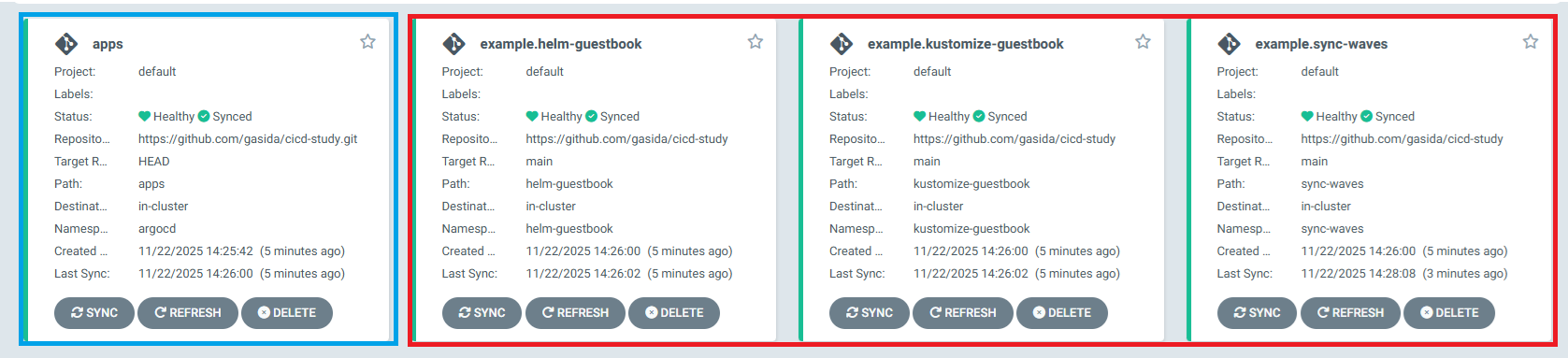
Figure 2.1 App of Apps 패턴 확인
App of Apps 패턴으로 Application들을 관리하게되면, 앱 개수를 동적으로 생성할 수 없고 Git 구조와 Application 구조 간 결합도가 높으며 확장성, 스케일링 문제가 있어 ArgoCD에서는 공식적으로 ApplicationSet Controller를 개발했습니다.
ApplicationSet Controller
ApplicationSet Controller는 ArgoCD의 Application CRD를 추가하는 Kubernetes Controller입니다.
다수의 Cluster와 MonoRepo내에서 ArgoCD Application을 자동으로 관리합니다.
하나 이상의 Git 저장소에서 여러 Application을 배포하게 지원합니다.

Figure 2.2 ApplicationSet 설명
ApplicationSet은 Generator 를 이용하여 다른 Data Source를 지원하는 매개 변수를 사용합니다.
List, Cluster, Git ... 등등 여러가지 Generator가 있으며 자세한 내용은 해당 링크를 통해 확인하시면 됩니다.
ApplicationSet List Generator 실습
AplicationSet에서 지원하는 List Generator 항목에 대해서 실습을 해보겠습니다.
# argocd app 배포
# .spec.generators.list.elemnets의 항목들 적용합니다.
# 첫번째 .cluster 에는 dev-k8s 두번째 .cluster에는 prd-k8s 값이 적용됩니다.
cat <<EOF | kubectl apply -f -
apiVersion: argoproj.io/v1alpha1
kind: ApplicationSet
metadata:
  name: guestbook
  namespace: argocd
spec:
  goTemplate: true
  goTemplateOptions: ["missingkey=error"]
  generators:
  - list:
      elements:
      - cluster: dev-k8s
        url: https://$DEVK8SIP:6443
      - cluster: prd-k8s
        url: https://$PRDK8SIP:6443
  template:
    metadata:
      name: '{{.cluster}}-guestbook'
      labels:
        environment: '{{.cluster}}'
        managed-by: applicationset
    spec:
      project: default
      source:
        repoURL: https://github.com/gasida/cicd-study.git
        targetRevision: HEAD
        path: appset/list/{{.cluster}}
      destination:
        server: '{{.url}}'
        namespace: guestbook
      syncPolicy:
        syncOptions:
          - CreateNamespace=true
EOF

# sync
argocd app sync -l managed-by=applicationset

# sync 수행 후 결과 확인
argocd app list -l managed-by=applicationset
# NAME                      CLUSTER                         NAMESPACE  PROJECT  STATUS  HEALTH   SYNCPOLICY  CONDITIONS  REPO                                      PATH                 TARGET
# argocd/dev-k8s-guestbook  https://dev-control-plane:6443  guestbook  default  Synced  Healthy  Manual      <none>      https://github.com/gasida/cicd-study.git  appset/list/dev-k8s  HEAD
# argocd/prd-k8s-guestbook  https://prd-control-plane:6443  guestbook  default  Synced  Healthy  Manual      <none>      https://github.com/gasida/cicd-study.git  appset/list/prd-k8s  HEAD

# 삭제
argocd appset delete guestbook --yes
ApplicationSet Cluster Generator 실습
AplicationSet에서 지원하는 Cluster Generator 항목에 대해서 실습을 해보겠습니다.
dev cluster에만 Label을 적용하여 dev cluster만 배포해보겠습니다.
# dev cluster secret 확인
kubectl get secret -n argocd -l argocd.argoproj.io/secret-type=cluster
# NAME               TYPE     DATA   AGE
# cluster-kind-dev   Opaque   3      6h43m
# cluster-kind-prd   Opaque   3      5h40m
kubectl label secrets cluster-kind-dev -n argocd env=stg

# env=stag label이 적용된 secret만 사용
# Cluster Secret과 .spec.generator.clusters.selector.matchLabels가 매핑이되는 Cluster 만 배포
cat <<EOF | kubectl apply -f -
apiVersion: argoproj.io/v1alpha1
kind: ApplicationSet
metadata:
  name: guestbook
  namespace: argo cd
spec:
  goTemplate: true
  goTemplateOptions: ["missingkey=error"]
  generators:
  - clusters:
      selector:
        matchLabels:
          env: "stg"
  template:
    metadata:
      name: '{{.name}}-guestbook'
      labels:
        managed-by: applicationset
    spec:
      project: "default"
      source:
        repoURL: https://github.com/gasida/cicd-study
        targetRevision: HEAD
        path: guestbook
      destination:
        server: '{{.server}}'
        namespace: guestbook
      syncPolicy:
        syncOptions:
          - CreateNamespace=true
        automated:
          prune: true
          selfHeal: true
EOF

# 배포된 Application Set 확인
argocd app list -l managed-by=applicationset
# NAME                       CLUSTER                         NAMESPACE  PROJECT  STATUS  HEALTH       SYNCPOLICY  CONDITIONS  REPO                                  PATH       TARGET
# argocd/kind-dev-guestbook  https://dev-control-plane:6443  guestbook  default  Synced  Progressing  Auto-Prune  <none>      https://github.com/gasida/cicd-study  guestbook  HEAD


# 삭제
argocd appset delete guestbook --yes


# 실습 후 Cluster 삭제
kind delete cluster --name mgmt ; kind delete cluster --name dev ; kind delete cluster --name prd'DevOps > Study' 카테고리의 다른 글
| CI/CD Study 7주차 Vault (2/2) (0) | 2025.11.29 |
|---|---|
| CI/CD Study 7주차 Vault (1/2) (0) | 2025.11.29 |
| CI/CD Study 5주차 ArgoCD 2/3 (1) | 2025.11.16 |
| CI/CD Study 4주차 ArgoCD 1/3 (2) (0) | 2025.11.08 |
| CI/CD Study 4주차 ArgoCD 1/3 (1) (0) | 2025.11.08 |